Your Training Density
This graph shows your training density for the last 365 days. The more you train, the more you will see the green squares.
Features
Precise Power Control
Maintain exact wattage targets with our advanced ERG mode that automatically adjusts resistance based on your cadence.
Lightning Fast
Get started instantly with no loading times. Our minimalistic design ensures you spend more time training and less time waiting.
Training sessions
We propose a catalog of structurized sessions to improve your workouts.
Frequently Asked Questions
I was bored by long loading times in other apps (like Zwift, MyWhoosh, Roovy...). My goal was to create a fast way to launch an activity and record it. For me, a good session means working on wattage zones, which is why wattage control is the only option.
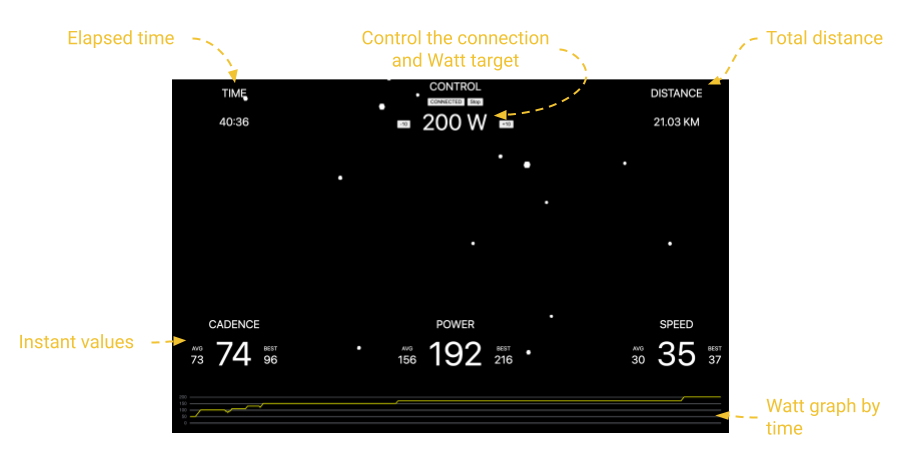
Click on Start, then click on Connect. You can adjust your power with buttons or key arrows (up, down, left, right). That's it! Don't forget to click on Stop to store the activity.
Bluetooth FTMS (Fitness Machine Service) is a Bluetooth profile that enables standardized communication between fitness equipment and apps for data exchange and control.
Functional Threshold Power (FTP) is the highest average power a cyclist can sustain for approximately one hour, measured in watts. It's a key metric used to gauge a rider's fitness, track progress, and establish personalized training zones.
You can find all your sessions stored in TCX format. The last sessions are registered in your browser; there is no server-side backup/save.
A computer with Google Chrome, a home trainer, or an exercise bike compatible with Bluetooth FTMS and with support for setting a target power (ERG mode = the resistance automatically changes based on your cadence to deliver constant wattage).
We use the same mechanism as YouTube to prevent sleeping. You need to keep the training tab visible. You can use the split-screen feature to watch YouTube or Netflix while training.
Check the requirements. If your device meets the requirements and still doesn't work, please contact us for assistance.
Yes! BullWatt is a 100% free indoor cycling app. Unlike Zwift or TrainerRoad, there are no monthly fees, no "free trial" limits, and no credit card required. It is designed for cyclists who want to train on their home trainer without the overhead of a expensive subscription.
BullWatt runs directly in your Google Chrome browser using Web Bluetooth. This means you don't need to download or install any software. Simply open the website, connect your FTMS-compatible trainer, and start your ERG mode workout instantly on any PC, Mac, or Android device.
Absolutely. As long as you use Google Chrome, BullWatt works on Android phones, tablets, and laptops. It leverages the Web Bluetooth API to talk directly to your bike, making it one of the most lightweight mobile training solutions available.
BullWatt supports any smart trainer that uses the standard Bluetooth FTMS protocol. This includes popular models like the Wahoo KICKR, Tacx Neo/Flow, Elite Suito/Direto, and Decathlon Domyos bikes. If your trainer supports "Controllable" Bluetooth, it will work with BullWatt.
Yes. Just connect your Strava account from the homepage and each session will be autmatically uploaded. Or after finishing your training session, you can export your data by TCX and upload it to Strava. This allows you to keep track of your fitness, mileage, and power data alongside your outdoor rides without needing a paid platform to manage the sync.
BullWatt is specifically designed for structured training. It offers a catalog of pre-set sessions—from SST (Sweet Spot Training) to VO2 Max intervals—all controlled via ERG mode. It's the ideal tool for riders who want a "no-nonsense" workout player that loads in seconds.
Yes! Because BullWatt is a web app, you can use split-screen mode or a second tab to watch your favorite shows or races. BullWatt includes a "Wake Lock" feature (similar to YouTube) to ensure your laptop doesn't go to sleep while you are in the middle of a hard interval.
No. BullWatt uses native Bluetooth through your browser. As long as your device (laptop/phone) has Bluetooth enabled and you are using Chrome, you can connect directly to your smart trainer without any extra dongles or hardware.
On the BullWatt home page, you can easily input your FTP (Functional Threshold Power) in the "Setup Your FTP" box. All the catalog workouts will then automatically scale the resistance to your specific fitness level, ensuring you are training in the correct power zones.
While other apps require huge downloads (often 10GB+) and high-end graphics cards, BullWatt is instant. There is no registration, no loading screens, and no heavy 3D graphics. It is the fastest way to get on your bike and start a high-quality, power-regulated workout.
- Domyos Challenge Bike
- Zwift Hub
- SUITO
- Saris
- KICKR CORE